Metadata for documents created in Stylo are serialized in YAML. This is a plain text format that allows data to be described explicitly on a [key : value] basis.
The metadata for each item is visible in the pane on the right-hand side of the interface, in the corresponding section.
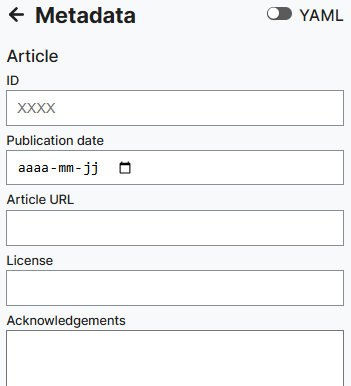
You can edit your metadata by entering the information in the default fields in the metadata form. Otherwise, by activating raw YAML mode in the upper right corner , you can fill in your metadata directly in YAML, which can allow you to add keys that are not present in the default form or to modify them. Note that adding a key and a value directly in YAML will not have it appear in the form.
The metadata of your articles corresponds to a certain “type” (article, blog post, meeting note, chapter) for which particular metadata fields have been designed. You can move from one type of metadata to another without losing information and with matches made between different fields (like “title” for each type). If you are missing any fields, you will need to add the option as a [key : value] in raw YAML mode.
For more information on how to manage your metadata, please refer to the YAML section of “Tutorials”.