From the Stylo home page, you have two options for creating an account: a local account on Stylo or an account via the Huma-num authentication service.
We suggest you create an account with Huma-Num, so you’ll have access to other tools hosted by this platform. You’ll also be able to retrieve your password if you forget it, which is not possible with a local account on Stylo.
If you already have a Stylo or Huma-Num account, log in here.
By creating an account, you’ll gain access to a personal space where you can store and manage your articles.
To create an account, start by clicking on the red button [Create a Huma-Num account]. This will take you to a page like this one:
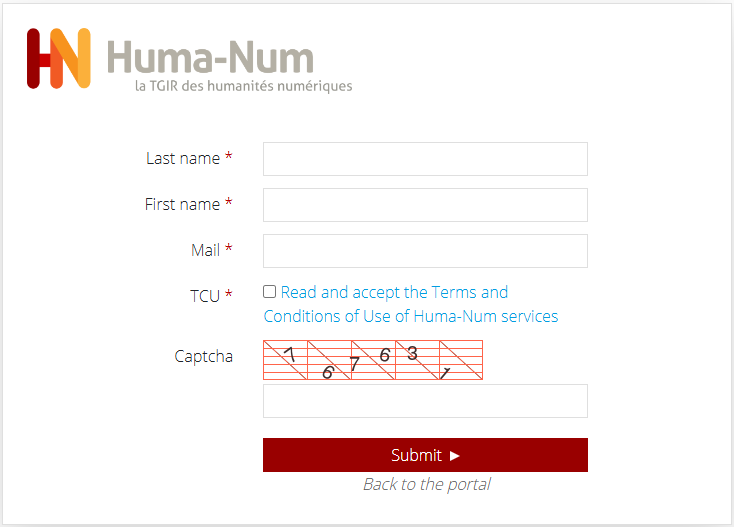
Simply enter your surname, first name and e-mail address. You must then accept the terms of use and enter the correct data in the Captcha.
You will then receive a confirmation e-mail. Confirm your e-mail address.
Back on Stylo, log in with your new Huma-Num account, enter your name, surname and institution, and your account will be created on Stylo!
See also: video to accompany the creation of a Huma-Num account
Having trouble creating your account? Don’t hesitate to contact us!
Delete your account #
It is possible to delete your account and all of your data (articles and corpus) of which you are the sole owner.
To do this, you must click on “My account” at the top right of the Stylo interface, then in “Modify my profile”. At the very bottom of this page is the red “Delete my account” button.
The deletion of your account is irreversible: once the request is confirmed, it will no longer be possible to restore your account or recover your data.
Data that you have shared with other users, whether directly or through a workspace, will remain accessible to those users after you delete your account.
We invite you to check your shared articles and backup your data if necessary before deleting.